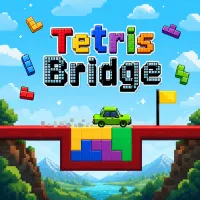
Tetris Bridge













Tetris Bridge combines creative construction and clever puzzles, challenging you to build safe crossings and help vehicles reach their destinations.
What Is Tetris Bridge?
Tetris Bridge is a physics-based puzzle game that blends Tetris-inspired block placement with bridge-building challenges. Players use geometric pieces to repair broken roads and create stable paths for vehicles.
Each level presents a damaged route that must be rebuilt. By placing the available blocks strategically, you can construct a bridge strong enough to support a vehicle crossing to the other side. As you progress, new hazards and more complex layouts require greater precision and planning.
Build Bridges and Complete Each Level
Every stage begins with a vehicle stranded at a gap in the road. Using a limited set of Tetris-shaped pieces, your goal is to create a sturdy bridge that allows the vehicle to cross safely.
Once all blocks are in place, the vehicle automatically drives across the structure. If the bridge holds, you advance to the next level. If it collapses or contains critical flaws, the vehicle falls, and you must try again.
To succeed, consider:
- The shape and size of each block.
- The vehicle's path across the bridge.
- Structural weak points that may collapse under pressure.
- Environmental hazards such as spikes, rocks, and uneven terrain.
- The most efficient use of the available pieces.
Careful planning and smart placement are often more important than speed.
Environmental Hazards
As the game progresses, bridge construction becomes increasingly challenging. Levels introduce obstacles that force players to adapt their strategies, including:
- Wide gaps that require strong support structures.
- Sharp spikes that limit placement options.
- Falling rocks that can damage unstable bridges.
- Uneven terrain that complicates construction.
- Narrow spaces that demand precise positioning.
Each obstacle adds a new layer of difficulty, encouraging creative problem-solving and experimentation.
Controls
- Mouse Drag: Move a block around the construction area.
- Left Click: Place a block in position.
- Rotate: Change a block's orientation before placement.
- Restart: Retry the level after a failed attempt.
Tips for Success
- Build a strong foundation before adding upper sections.
- Use larger blocks to reinforce key support areas.
- Avoid leaving large unsupported gaps beneath the bridge.
- Experiment with different layouts if a solution fails.
- Identify and reinforce sections where collapses occur.
- Create a smooth surface so the vehicle can cross without difficulty.