BookWorm Online






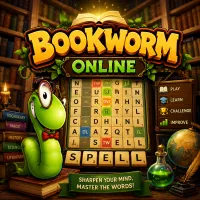
Play BookWorm Online, a classic word puzzle game where you create words, earn bonuses, clear burning tiles, and achieve high scores.
Overview
BookWorm Online is a classic word puzzle game that challenges players to build words from a grid of letter tiles. Developed by PopCap Games, the game combines vocabulary skills, strategy, and pattern recognition into an addictive experience suitable for all ages.
The objective is simple: create words, score points, and keep the board under control. However, special bonus tiles and dangerous burning tiles add extra layers of challenge that keep every session exciting.
Create Words and Earn Points
To play, connect adjacent letters to form valid words. Once a word is completed, the selected tiles disappear and new letters fall into place.
Longer words reward more points, while rare letters such as X and Z provide higher values. Successful players constantly search for opportunities to create larger words and maximize their scores.
Key objectives include:
- Form words using adjacent letters.
- Create longer words for bigger rewards.
- Use high-value letters whenever possible.
- Earn bonus points through special tiles.
- Prevent burning tiles from reaching the bottom of the board.
Special Tiles and Burning Letters
As the game progresses, special tiles begin appearing on the board.
Green, Gold, Sapphire, and Diamond tiles grant score bonuses when used in words, making them valuable tools for achieving higher scores.
Burning Tiles are the greatest threat. These red letters gradually move downward after each turn. If a burning tile reaches the bottom row, the game immediately ends. Removing them quickly is essential for survival.
If no useful words are available, players can ask Lex the Bookworm to shuffle the board. While this creates new letter combinations, it also reduces the current score.
Controls
- Left Mouse Button: Select and connect letters.
- Drag Mouse: Form words across adjacent tiles.
- Release Mouse Button: Submit a word.
- Click Lex: Shuffle the board.
- Mouse Navigation: Access menus and game options.
More Brain Games